Live Preview
LibreChat in practice
This is what LibreChat looks like in a real enterprise deployment.
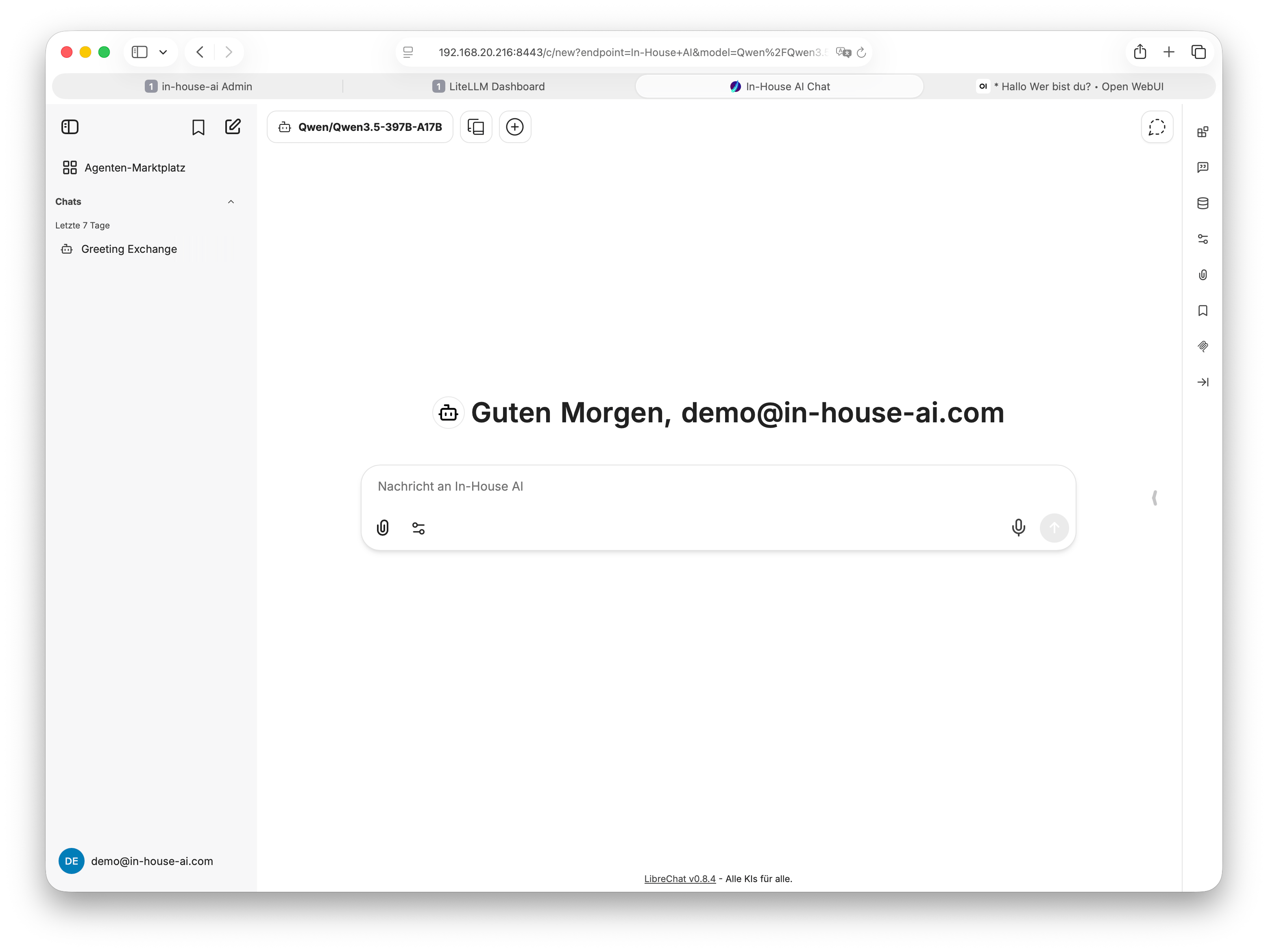
LibreChat is the powerful open-source platform for teams that need more than a basic chat interface: multi-user management, plugins, customizable assistants – all running on your own hardware.
LibreChat is an open-source AI chat platform originally developed as a full replacement for ChatGPT – with the key difference that it runs entirely on your own hardware. The project is actively maintained and backed by a large international community.
LibreChat is particularly well suited to organizations and teams that require greater control and configurability: department heads who want to set up dedicated assistants for their teams, IT departments that need centralized user management, or companies that want to integrate existing workflows into AI chat via plugins.
Like Open WebUI, LibreChat runs entirely within your local network – not a single word from your employees ever leaves your environment. GDPR-compliant by design, with no data processing agreements with US corporations required.
LibreChat is at its best when...
...different departments need different AI assistants.
An assistant for the legal team behaves differently from one
for sales – LibreChat lets you configure and manage these roles
centrally.
LibreChat is also the better choice for organizations with an
existing Active Directory or SSO system: users log in directly
with their familiar company credentials.
LibreChat offers a significantly broader feature set than simple chat frontends. Here are the most important capabilities for professional enterprise use.
Individual accounts for every team member, with roles and permissions managed centrally – ideal for larger teams.
Create pre-configured AI assistants for different departments – each with its own roles, prompts, and models.
Extend LibreChat with custom functionality: web search, code execution, database integration, and more.
Upload your own documents and embed them permanently in a knowledge base. The AI knows your internal materials.
Sign in via existing company accounts using LDAP, Active Directory, or SAML – no separate password required.
Multiple models available simultaneously – users choose within the chat which model to use for each task.
Admins can see how and how intensively LibreChat is being used – without access to chat content.
Upload and analyze images – fully local with multimodal models, with no cloud detour required.
Logo, colours, and labels can be adapted – LibreChat can be configured to match your corporate design.
This is what LibreChat looks like in a real enterprise deployment.
Both interfaces use the same AI models under the hood – the quality of AI responses is identical. The difference lies in the feature set and complexity.
| Feature | LibreChat | Open WebUI |
|---|---|---|
| Learning curve | Medium – more configuration required | Very low – immediately intuitive |
| Multi-user & roles | Comprehensive & fine-grained | Basic support |
| Customisable assistants | Yes – configurable per department | Limited |
| Plugin system | Yes – extensible | No |
| SSO / Active Directory | Yes | Limited |
| Document upload | Yes | Yes |
| GDPR-compliant local | Yes – fully local | Yes – fully local |
| AI model quality | Identical | Identical |
| Ideal for | Teams of 10+, IT-savvy organizations | Quick start, small teams, simple use cases |
LibreChat is technically more demanding than simple chat frontends – we handle the complete setup on your behalf.
Delivery and setup of suitable hardware – including the database server required for LibreChat's user management.
Full installation including database connection, network integration, and SSL certificate for your internal network.
We set up user accounts, department roles, and initial assistants together with you.
Training for administrators and end users – your team is up and running the same day.
That is perfectly normal – the differences become clear most quickly through a direct comparison. Get in touch and we will give you access credentials to our live demo of both systems, or walk you through the interfaces together.
We advise without sales pressure and help you decide what truly fits your team and daily workflows. Worth noting: both interfaces use the same underlying LLM runner – the AI quality is identical in both cases.
Get in touch – we will give you access to our live demo or walk you through LibreChat and Open WebUI in person. Free of charge, no commitment, no sales pressure.